
How Can We Help?
How to setup email alert for Sunba performance series cameras?
After the configuration of E-mail, when alarms are triggered, the camera will send messages with alarm snapshots to the specified E-mail address.
Please follow the steps below:
- Click Setup > Network > E-mail.
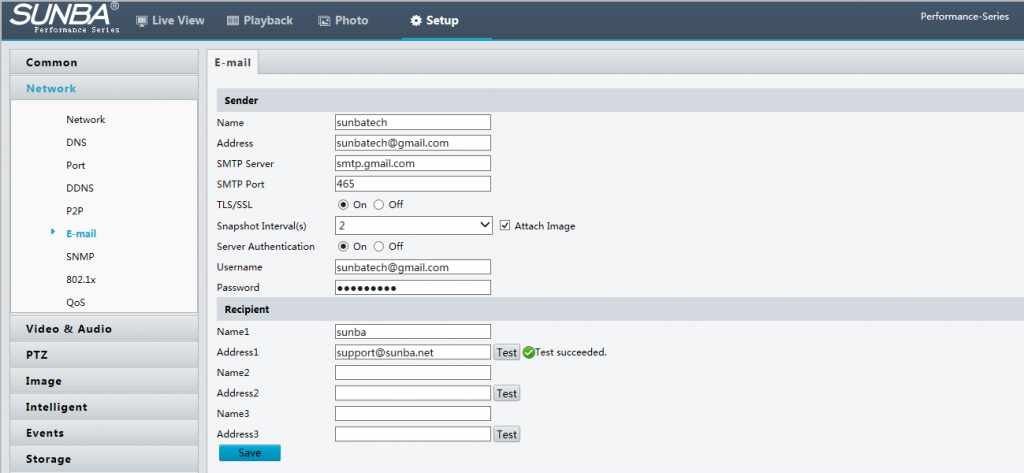
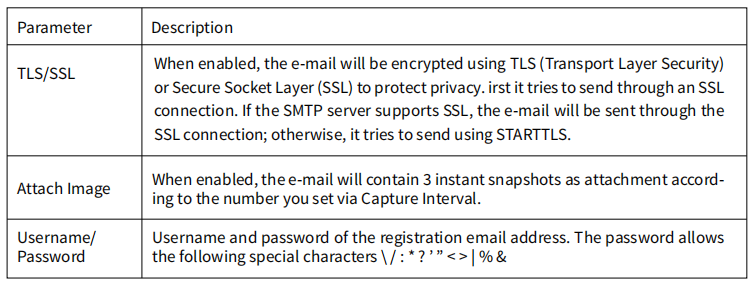
2. Configure relevant parameters of the sender and the recipient. You may end a test email alert setting the recipient address. The following table describes some major parameters.
3. Click Save.
Note: Please make sure the SMTP service of your email can enable third party software, otherwise you will not be able to receive email alerts from the camera.
Also, please make sure the DNS is 8.8.8.8 if you are using Gmail. If the test is unsuccessful, please refer to How to fix the “Mail Testing – Failed to connect to server?” w/ Gmail?
