
Overview We have identified that some UniFi PoE switches support both standard IEEE 802.3af/at PoE and 24V Passive PoE on certain ports. Improper PoE mode configuration may cause damage to standard PoE devices. SUNBA PoE cameras are designed to operate with IEEE 802.3af / 802.3at-compliant PoE power sourcing equipment. Important Compatibility Note Some UniFi PoE […]
Archives: FAQ
Why My P636 camera on NVR-PF10-4K has noise or no audio out? How to enable the audio storage?
Since the default audio format of SUNBA P-series cameras is AAC format (convenient for YouTube live streaming), but AAC format is not supported in the audio decoding format of NVR, so you cannot hear the sound of SUNBA P-series cameras in NVR (such as P625 V2 and P636 V2).Solution: Log in to the camera web […]
How to upload snapshots to your FTP sever?
You may follow the steps below to set up FTP: Note: For uploading snapshots taken by smart functions (such as Face Capture, Cross Line and Intrusion, etc.), please refer to Smart FTP configuration. General FTP configuration Click Setup > Storage > FTP > General. Set the IP address and port for the FTP server, username and password […]
How to setup email alert for Sunba performance series cameras?
After the configuration of E-mail, when alarms are triggered, the camera will send messages with alarm snapshots to the specified E-mail address. Please follow the steps below: Click Setup > Network > E-mail. 2. Configure relevant parameters of the sender and the recipient. You may end a test email alert setting the recipient address. The […]
How do I check for firmware upgrade for my device?
Please go to individual product page, and refer to the download section. If the upgrade isn’t successful, please contact [email protected]. Please refrain from disconnecting the power of the cameras during the upgrade.
Sunba Illuminati YouTube RTMP Connection Issues [Warp-up]
The following troubleshooting is based on the assumption that all network-related devices are connected well and functioning properly, and the camera lens module is not defective. a) YouTube stream would disconnect after a while. Please update to the latest firmware by following the instruction here: https://sunbatech.com//product/sunba-illuminati/Download Tab: https://sunbatech.com//product/sunba-illuminati/?attachment_id=5507&download_file=ruhyyr1t1ylvn We’ve also encountered another case that the […]
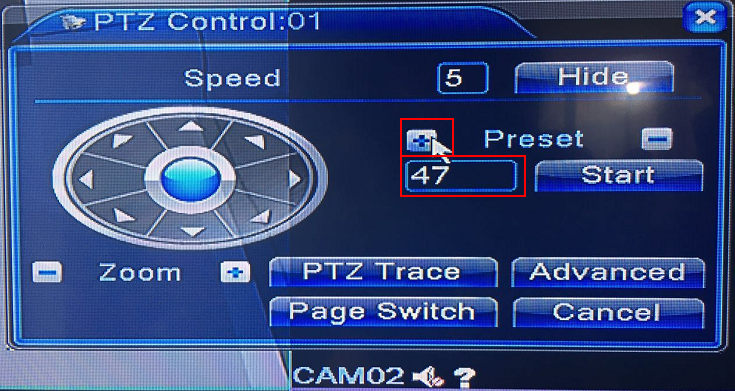
How to set up automatic scan for Sunba Analog PTZ camera?
Automatic Scan is usually defined by PTZ as left and right boundary scan, meaning the camera will rotate from one point to another continuously. This can be done by using the preset function of the camera. You must first go to the corresponding preset control panel of your DVR. For Sunba 604-22X analog camera, please […]
How to factory reset my Sunba IP camera(For Lite Series Only).
For Illuminati, please visit this link. Method A:Self recovery password (Recommend) Firstly you need to make sure your VMS version support this is. If not,please update your VMS to the lasted version VMS (03/06/2023 version): NOTE:This function support the camera after 2023. You need to use the XMEye APP to scan the recovery code in order to […]
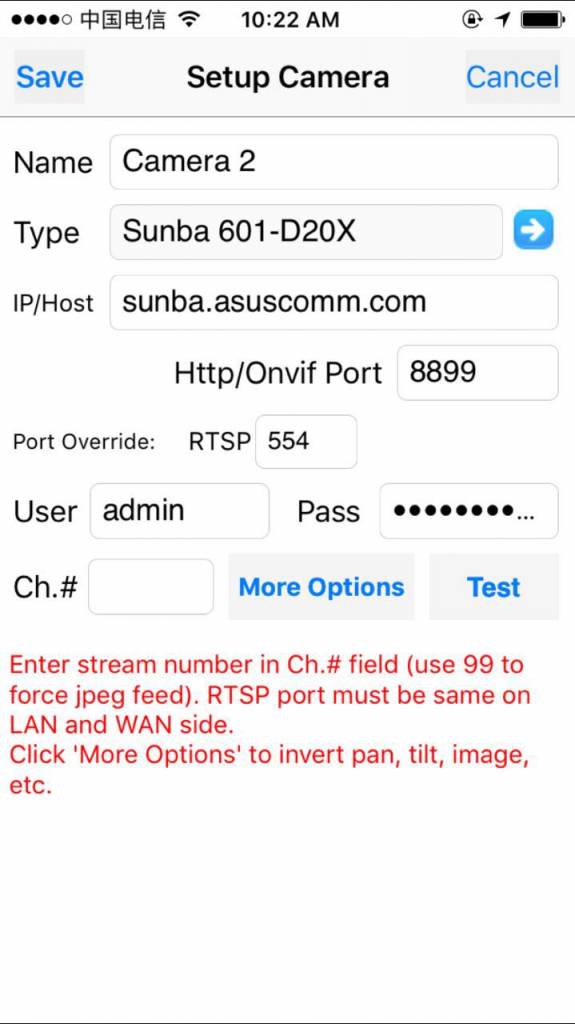
What mobile apps can I use to control my Sunba IP camera or DVR/NVR?
There are two ways of accessing your camera remotely through smartphone (click to learn the general idea): Port Forwarding P2P Non-auto tracking model (805-D20X / 507-20X /601-D20X / DVR/ NVR): XMEye – P2P / Android + iOS First, get your P2P code and make sure the NAT Status is connected: Second, please download the app and connect […]
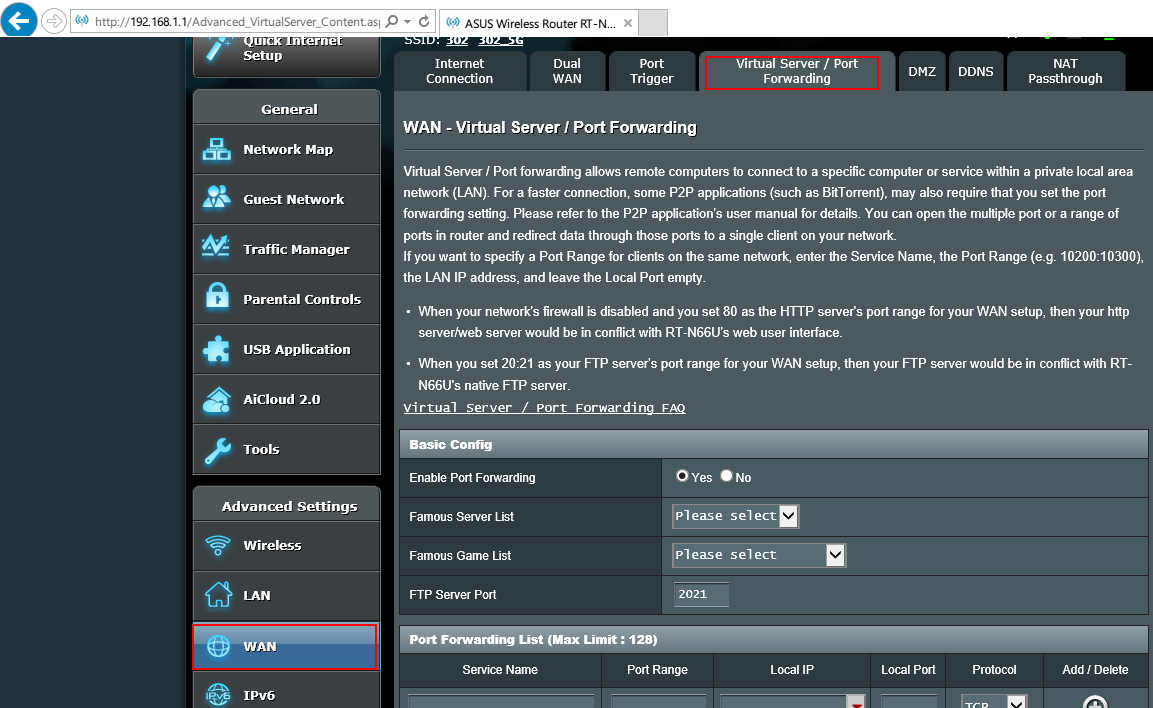
What is port forwarding?
Configuring port forwarding for your IP camera enables you to access your locally connected camera on the secure side of the router (via LAN) anywhere with internet at a different location (VIA WAN) through PC/Mac or Smartphone. It basically just forwards all traffic of your private camera to a public network. Port forwarding must be supported by […]
