
How Can We Help?
Login Timed Out Error (Port Conflict)
This applies to 507-20XB, 601-D20X, 805-D20XB and all non-auto tracking IP cameras.
Timed Out Error (Port Conflict)
- If you need to have a reset because your camera has been locked when you are trying to access over IE and shows “timed out” error. The problem is usually caused by the port conflict, meaning the TCP (media) port has been changed to 554 that conflicts with the RTSP port.
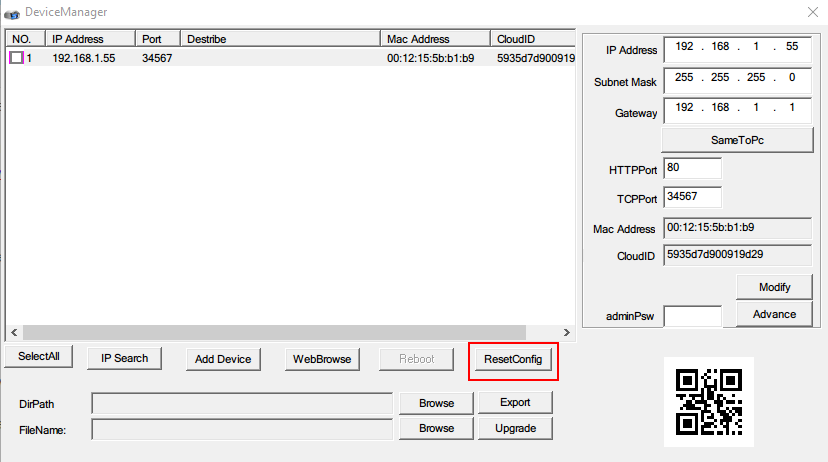
In this case, please use Device Manager to search the camera and then choose ResetConfig to see if you are able to modify the network setting.
Device Manager Download Link: https://www.dropbox.com/s/nzpaermp2hgr6ht/General_DeviceManage_V2.5.2.2.T.20160412.exe?dl=0
Alternatively, please try downloading ONVIF Device Manager:
http://sourceforge.net/projects/onvifdm/
And see if you can modify the RTSP/HTTP port to other value first so that it does not conflict with the HTTP port:
https://wiki.allprojects.info/display/ODMDOC/3.+Application+Configuration

