
For H.265 IP camera, please apply the following preset code: Please use preset 250+251 (call PRESET 250, PRESET 251 successively) to initialize the lens over daytime. For H.264 IP camera, please apply the following preset code: Please use preset 189+204+20 (call PRESET 189, PRESET 204, PRESET 20 successively) to initialize the lens over daytime. Please use preset 189+205+20 (call PRESET 189, PRESET 205, PRESET 20 successively) to initialize the lens over night. You should notice distinct lens movement and the initialization shall take a few minutes to complete. If you cannot make the lens to initialize properly, please feel free to contact [email protected] for assistance. For Analog camera, please apply the […]
アーカイブ: FAQ

My Sunba analog camera cannot PTZ
Please first check the +/- polarity of RS485 twisted pair between the camera and DVR (or Joystick). The package comes with a white RS485 adapter that you can connect it to the orange and blue end coming out of the camera. In most cases, the blue end corresponds to +/A (positive) of the DVR’s RS485 port and the orange end corresponds to the -/B (negative) of the DVR’s RS485 port. So the wiring would be as follows: In the above diagram, the twisted pair (RS485 cable) has red/blue wire. The red wire was connected to the blue RS485 end out of the camera. We already know the blue end corresponds to +/A (positive side) of the DVR. Thus, on the DVR’s end, the red wire would be connected to polar A. […]
How to setup a home position for Sunba IP camera?
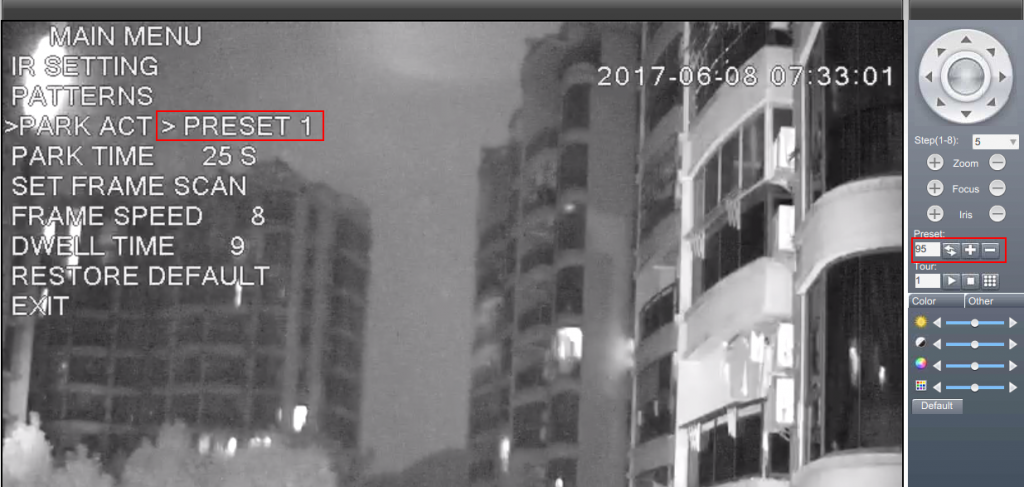
A home position is defined as a view where the camera will always return to when it no longer receives further commands from users. You will first have to setup your home position as a preset by following the guideline here: https://sunbatech.com//en/faq/setup-preset-views-sunba-ip-camera/ You will have to set this specific preset as a “park act”. This is also called “idle action”. Please first open the OSD menu of the camera by calling preset 95. The way to call preset depends on the specific software/NVR/DVR you use. Below is an example of calling preset 95 using IE. Use up and down key to select an option, and right key to confirm, left key to […]
How to setup preset views for Sunba IP camera?
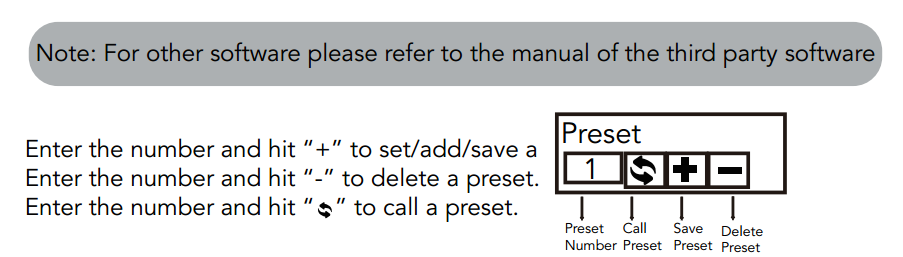
Below is the preset control panel for IE/CMS and VMS. For other software or NVR, please refer to the instruction of the relevant tool. To setup presets, you have to first be familiar with the presets control panel. First, please go to a desired position use the direction panel. Then please enter the preset number that you want this position to be. For example, we set this position (coordinates) as preset 1. So we put 1 in the empty preset box and hit “+” to save this position as preset 1. Then we move the direction panel to get to a random position. Enter 1 in the preset […]
How to reset the IP camera’s mainboard and lens module?
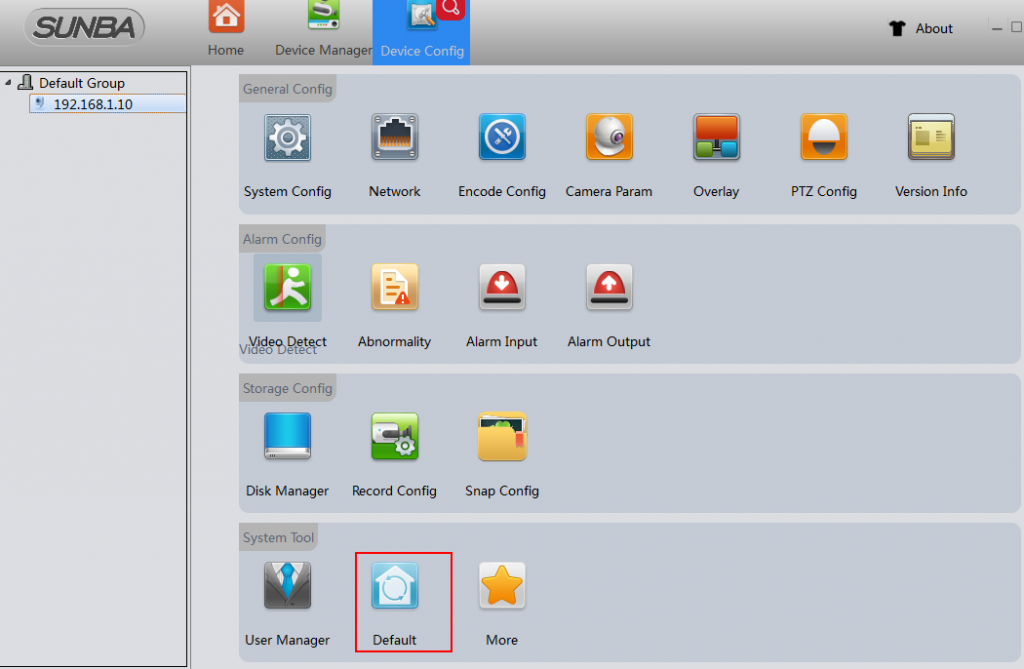
Reset Lens Module in Device Config->Default (via Internet Explorer): Reset mainboard in OSD Menu (call preset 95) and use up and down key to select the restore default option. For certain models such as 507-20XB, the option may be on the 2nd page: Reset the lens module and the main board on VMS. please power cycle the camera after resetting. Note: the IP address of the camera will restore the default valules– 192.168.1.10 after resetting the lens.
How can I set a Patrol/Cruise/Tour to run consistently?
You will have to set patrol as a “park act”. This is also called “idle action”, meaning the camera will perform this action over and over if no further commands are received from users. Please first open the OSD menu of the camera by calling preset 95. The way to call preset depends on the specific software/NVR/DVR you use. Below is an example of calling preset 95 using IE. Use up and down key to select an option, and right key to confirm, left key to go back to the previous option.
Sunba IP Camera Recording Option
Note an IP camera can work standalone without a NVR, which is different from a traditional analog system where Digital Video Recorder is a must-have. In terms of recording, there are few options you can select from: A. Record to a computer. This requires you to have a dedicated computer that is on for 24/7. This means if you shut down your PC/Mac, then the recording will stop as well. B. Record to a TF card. Most Sunba IP cameras would have a built-in TF card slot that support up to 128GB micro SD card. 405-D20X can have the TF card pre-installed before shipment if you order from our website. 406-D20X, 305-D4X 405-ECO don’t […]
Internet Explorer Snapshot/Video Record Failed
Please add the camera’s IP or domain to the trusted sites of your internet explorer browser as follows and try restarting the browser. Do NOT check the “require server verification (https:)” option.
My Sunba analog camera doesn’t show any video
In terms of the no video issues, there are plenty of possibilities: 1. Though we’ve tested the camera before shipment, it is likely the BNC wiring tail get damaged during transportation (distinctly chopped or squeezed). In this case, we will definitely send you a replacement cable. [this happens only rarely on 301 model, whose wiring tail is separate] 2. Test the camera with another BNC cable. Sometimes the BNC cable can get short or has unstable video connection. Try tightening or twisting the BNC RG59 connector part. Alternatively, test the BNC cable on another analog camera you have. 3. Switch the camera to another BNC video channel on DVR. Some channel […]
What screws do I have to use for installing the camera?
Fundamental Standard: 601-D20X/805-D20XB (wall bracket/Ceiling Mount) – M6 405 Series Wall Mount – M4 405 Series ceiling Mount – M6 We do not offer bolt with the camera as there are too many types available and the application is very critical and depends on where/how you would like to install the camera. For example, many people are using the camera with their pole or corner mount that has smaller hole size as compared to the camera’s mount bracket. So you will probably need one size smaller. Also, if you are installing the camera on wood board, you generally will choose self-tapping screws for safety concerns. Similarly, if you are installing the […]
